AI models for your clothing brand
How to use an AI model for your clothing brand: an on-model lookbook that keeps fit, fabric, colour and print accurate, and when to book a real shoot.

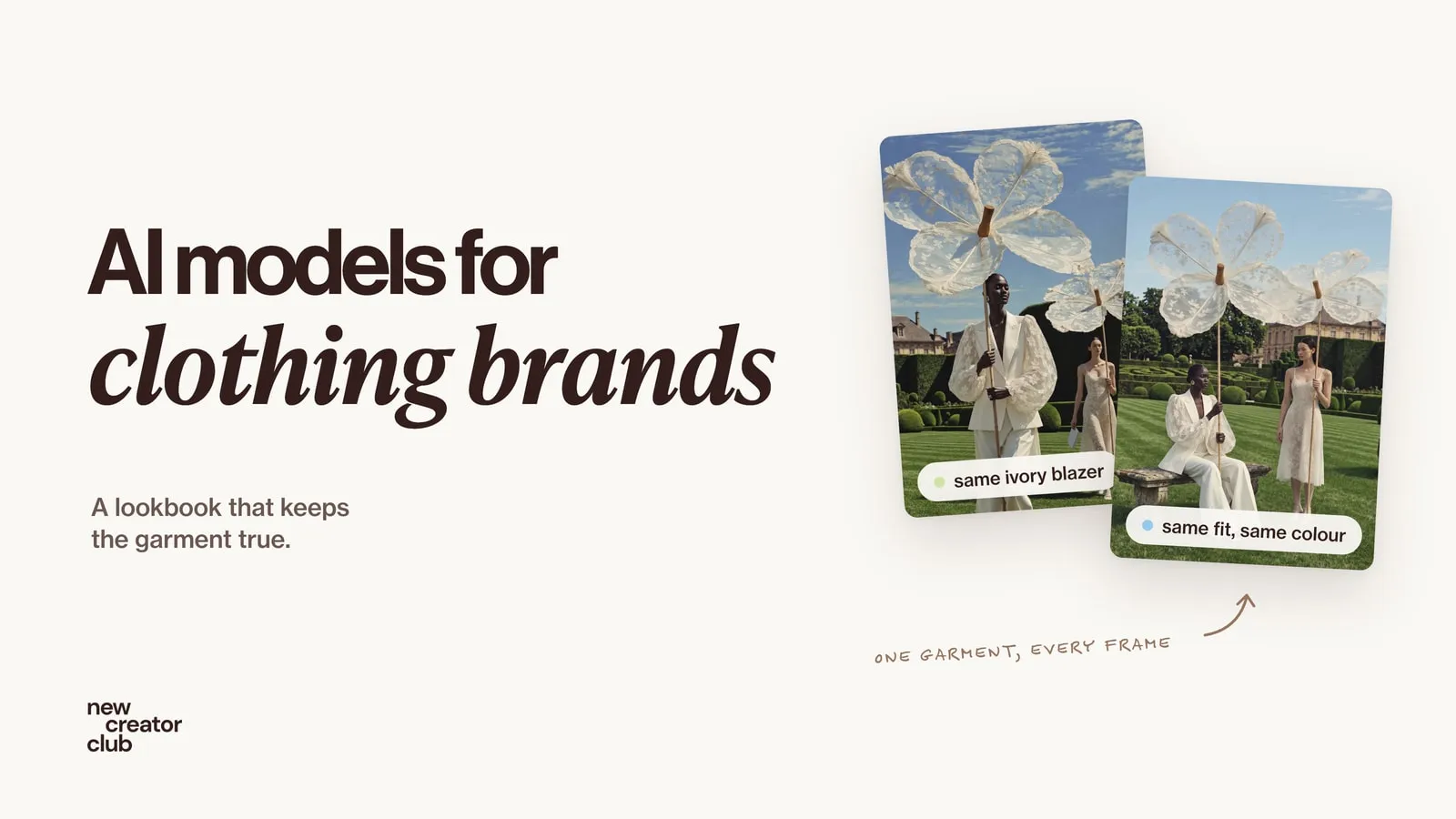
Yes, a small clothing brand can put its real garments on an AI model, and it works best for lookbooks, campaigns and social. Start from good photos of the actual garment, lock one model with a reference, check every image against the physical piece for fit, fabric, colour and print, and keep real photos for the shots buyers use to judge size and colour.
An AI model for your clothing brand can give you a full lookbook without booking a studio, a photographer and a model for a day. It can also quietly change your clothes: a linen weave becomes smooth cotton, a pocket moves, a stripe disappears, a sleeve gets shorter. For a brand that sells clothes, that is the real risk. This guide shows how to put your actual garments on an AI fashion model, keep the same model across a set, and check every image against the real piece.
What an AI model can and can't do for a clothing brand
| Good for | Risky for |
|---|---|
| Campaign and lookbook mood | Exact fit and how it sits on a body |
| Variety of locations and poses | Fabric drape, weight and texture |
| Social content | True colour on the product page |
| Testing ideas before a real shoot | Fine prints, small logos and embroidery |
| Showing a style in different settings | The back of a garment you didn't photograph |
The rule of thumb: AI for the world around the clothes, real photos for the details buyers rely on.
Step 1: Photograph the garment properly
The input photos decide how accurate the result can be. You don't need a studio, just even light and a careful shot list:
- Flat lay, front and back, on a plain surface, no heavy creases.
- On a hanger or mannequin, so the shape is visible.
- Close-ups: fabric weave, print, buttons, stitching, labels.
- A colour reference: one frame with a grey card or a white sheet of paper, in daylight.
- Measurements: written down, for checking length and proportion later.
This also answers a common question: how to photograph clothing without a model. A clean flat lay and a hanger shot are enough to start.
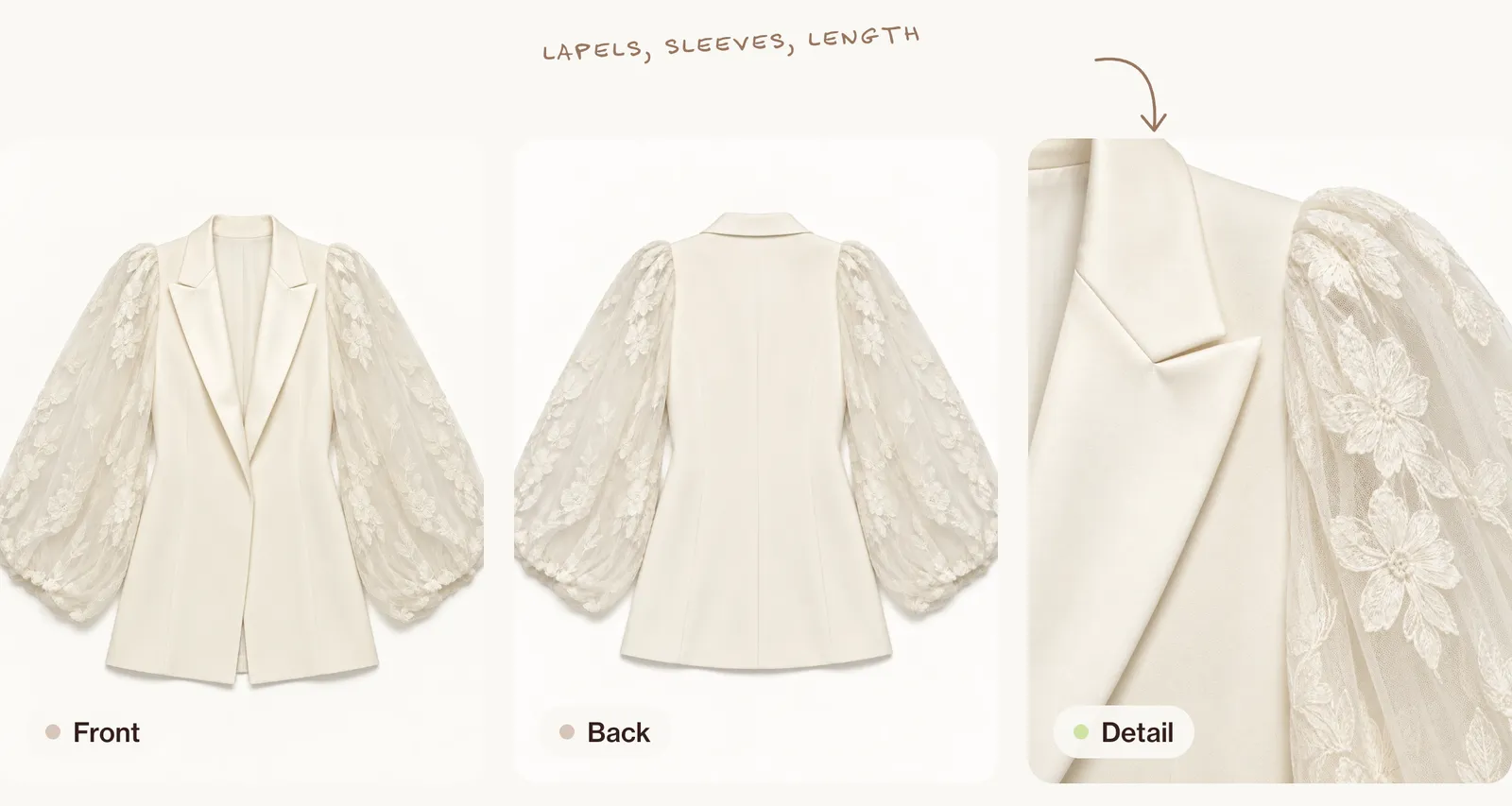
Our blazer comes from a concept campaign we made with AI, so its packshots were made with AI too. With a real garment, these are your own photos.
Step 2: Create one consistent model
Invented, or a real person's licensed likeness
The simplest choice is an invented AI fashion model. If you want a real model's likeness, you need their written consent, payment and an agreement on where and how long the images will be used. In March 2025, H&M announced it was creating AI "twins" of models with their consent, and the models were paid for their use, a public example of doing this properly. Never create a look-alike of a real person who hasn't agreed.
A reference sheet
Generate one reference sheet and reuse it for every image:
Creative direction: a model reference sheet for a small clothing brand, used to keep the same person across a lookbook. Art direction: the same woman shown four times side by side on one sheet: front view, three-quarter view, profile and full body standing straight, arms relaxed. She is in her mid-twenties, very tall and slim, with deep dark-brown skin, high cheekbones, full lips, dark brown eyes, a long neck and black hair slicked back into a small low bun; small silver flower-cluster earrings and no visible tattoos; a plain fitted black top and black trousers so the body shape is clear. Material: matte black cotton jersey, no logos; real skin with visible pores and a soft natural shine on the cheekbones and forehead. Palette: light grey seamless background, black clothes, her deep brown skin, a glint of silver. Lighting: hard, even studio flash from the front, a crisp short shadow on the floor behind her feet, nothing hidden in shadow, so the face reads clearly in every view. Photography: straight-on, 50mm look at f/11, full body visible in the fourth panel, horizontal 16:9 sheet, everything sharp. Mood: calm, composed, a natural closed-mouth expression. Post-processing: true colour, unretouched skin, no smoothing, no stylisation.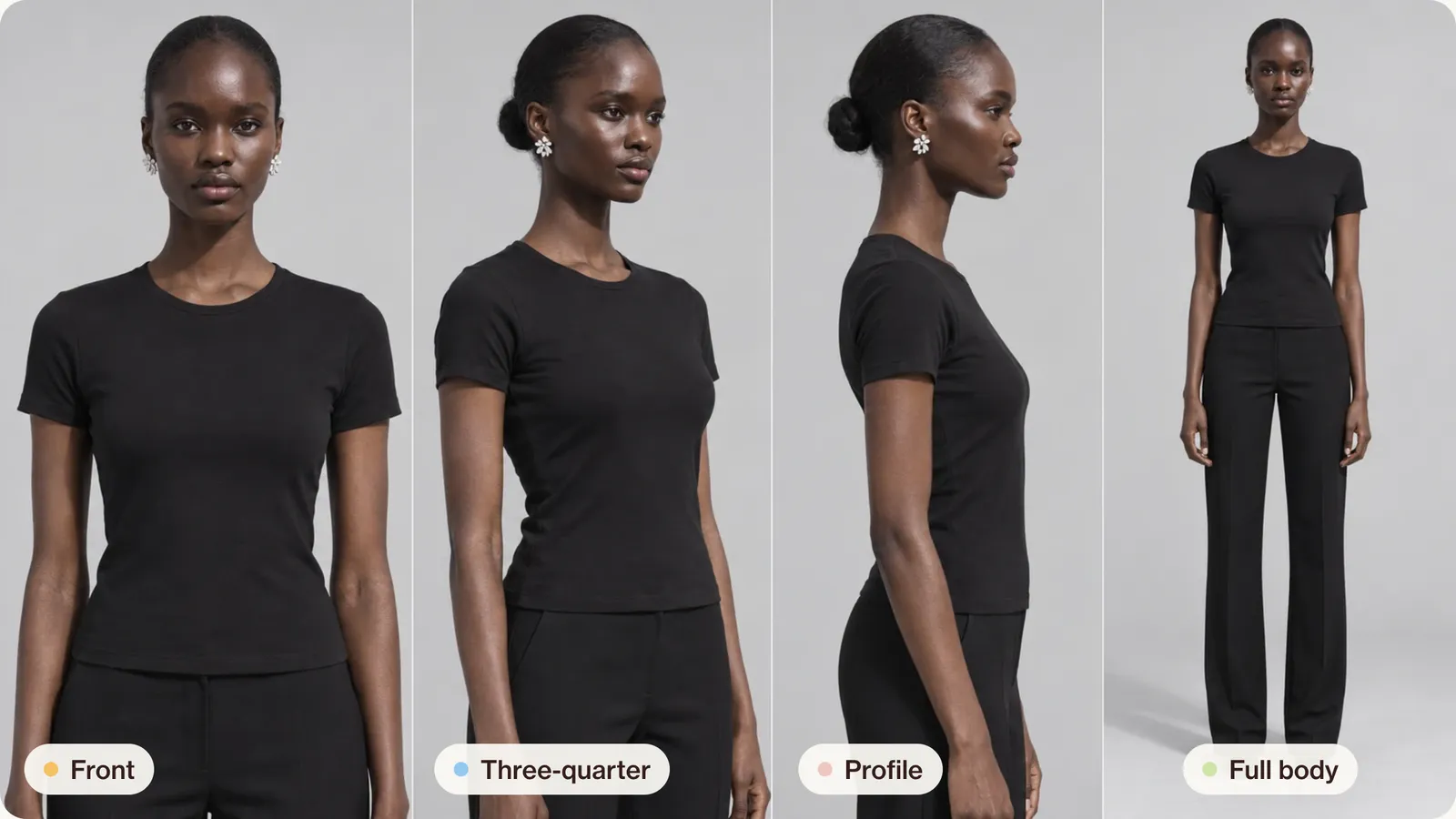
Body and size
If you show clothes on one size, say which size the model wears, as you would for a real model. Don't let AI reshape bodies to make a garment look better than it fits.
Step 3: Put the garment on the model
There are two routes:
| Route | How it works | Pros | Cons |
|---|---|---|---|
| A general image model | Attach the garment photos and the model reference to a tool such as Nano Banana or ChatGPT | Full control of scene, light and pose | Needs careful prompts and checking |
| A dedicated try-on tool | Upload the garment and choose a model | Quick and simple | Less control; garment details can still change |
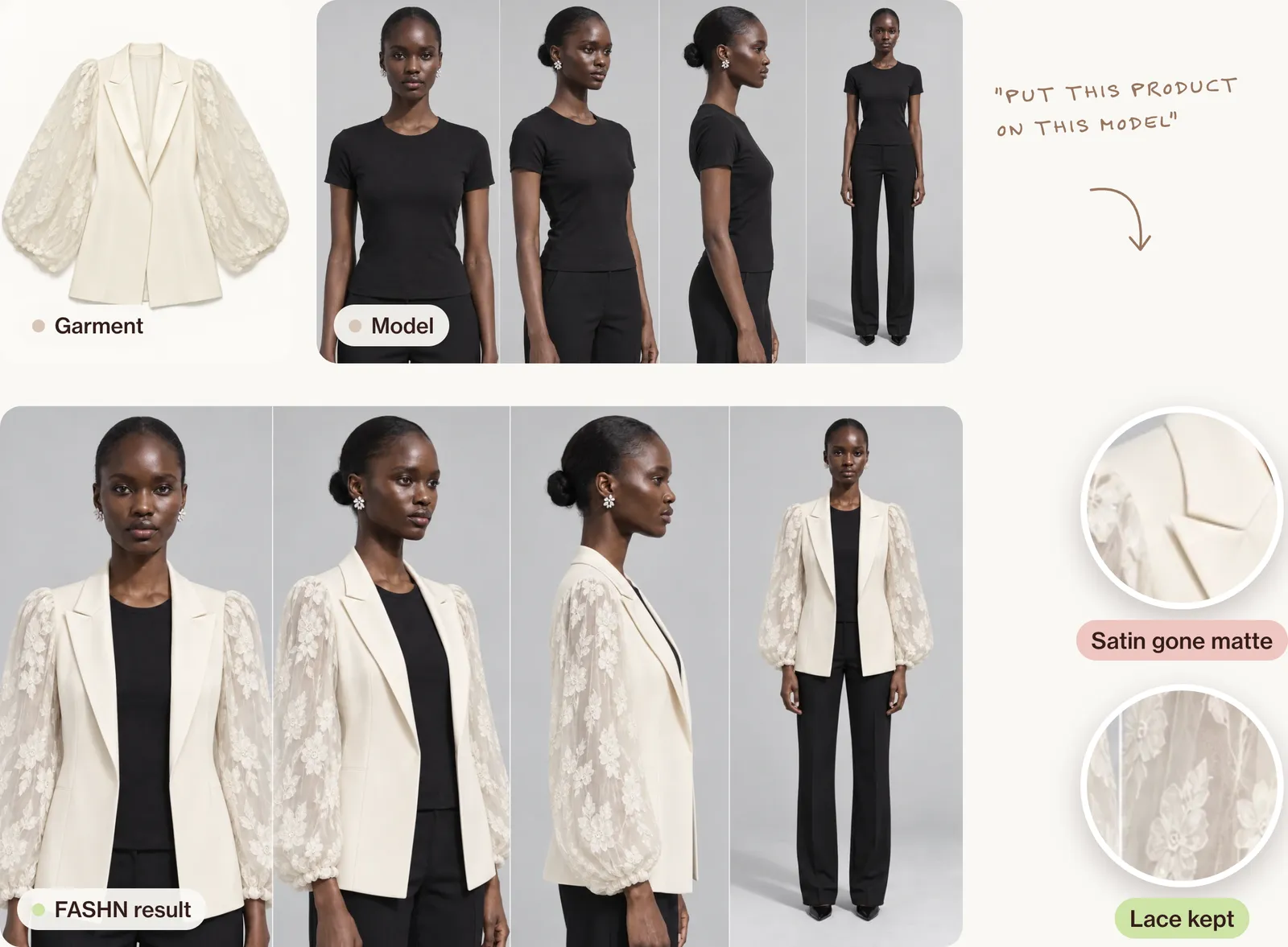
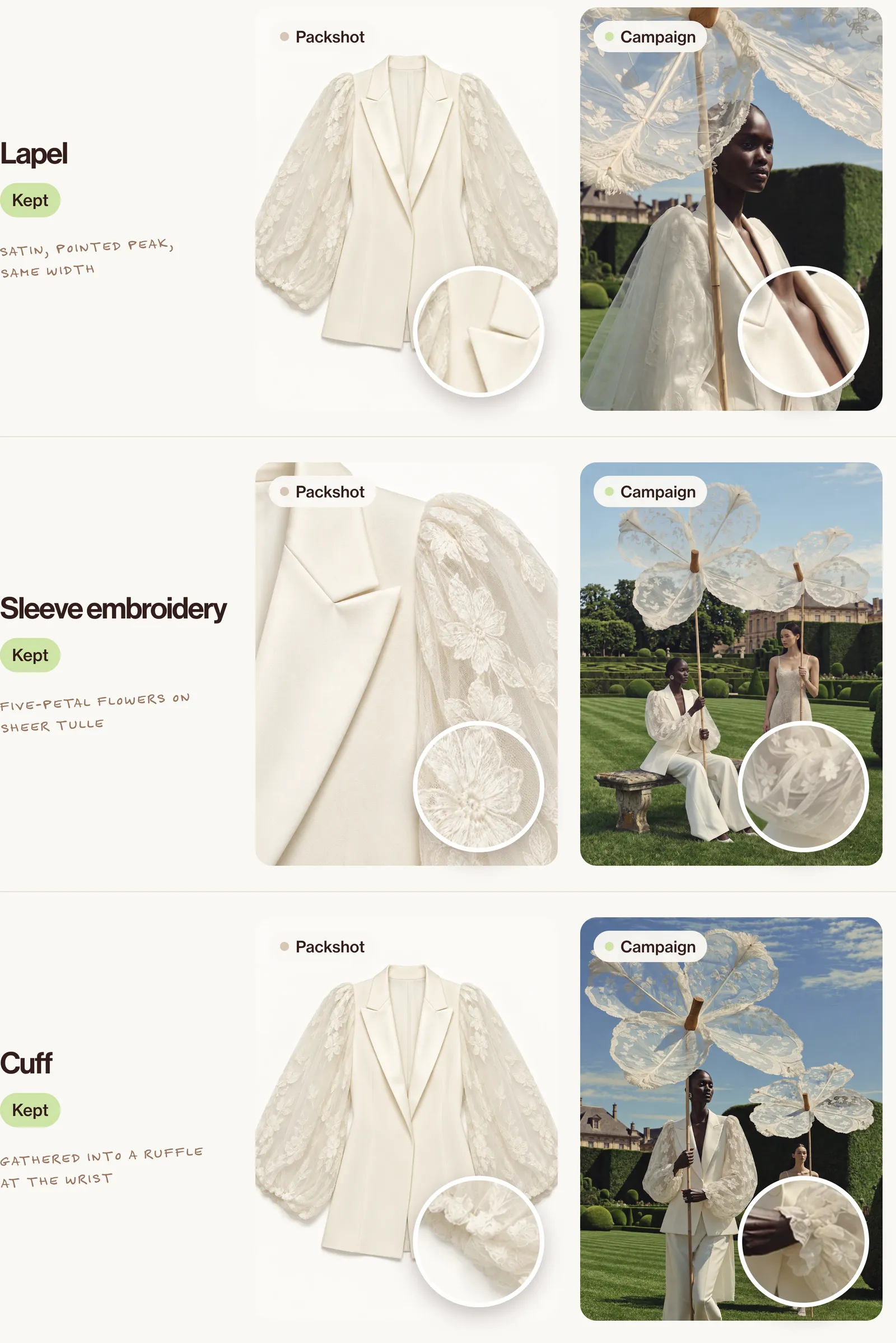
We tried the try-on route with FASHN: the front packshot, the model reference sheet and one plain line, "Put this product on this model". In all four views it kept the cut, the length, the seams and the lace sleeves with their gathered cuffs. It missed the finish: the satin lapels came out the same matte as the rest of the blazer. Quick, then, but check sheen and texture as closely as shape.
The garment sentence
Like the product sentence in product photography, write one precise description of the garment and paste it word for word into every prompt. Write it from the real piece, for example:
An ivory single-breasted blazer with a smooth, matte crepe body, fitted at the waist with princess seams and ending at the hip, peak lapels faced in ivory satin with a soft sheen that open to a deep V, a concealed front closure, and full, sheer ivory tulle balloon sleeves embroidered with five-petal flowers and leaves, gathered at the shoulder and into a ruffled cuff at the wrist.A lookbook prompt
Attach the model reference sheet, the front and back packshots and the detail close-up:
Creative direction: a bridal tailoring campaign in a French château garden, shot like a fashion magazine story on medium-format film. Art direction: the woman from the reference sheet walks slowly towards the camera across a striped lawn, holding a giant lace flower on a tall bamboo pole above her head like a parasol, chin lifted, eyes lowered; she wears the blazer from the garment photos open over wide ivory trousers. The blazer is an ivory single-breasted blazer with a smooth, matte crepe body, fitted at the waist with princess seams and ending at the hip, peak lapels faced in ivory satin with a soft sheen that open to a deep V, a concealed front closure, and full, sheer ivory tulle balloon sleeves embroidered with five-petal flowers and leaves, gathered at the shoulder and into a ruffled cuff at the wrist, and must match the photos exactly: the same colour, fabrics, lapels, sleeves and length. Further back, a second model in an ivory lace slip midi dress carries a smaller lace flower and a white envelope. Material: the lace flowers are sheer embroidered tulle stretched over thin wooden ribs, with frayed fringe at each tip and a carved wooden knob at the centre; matte crepe, satin lapels and see-through tulle sleeves; freshly mown lawn, clipped yew hedges and topiary balls. Palette: ivory and cream, deep lawn green, a clear summer-blue sky with a few streaks of cloud, the honey stone of the château. Lighting: hard summer sun from the upper left, crisp shadows on the grass, sunlight glowing through the lace flowers and the sleeves. Photography: a low angle from hip height so the flower fills the sky, 50mm look at f/11, everything sharp from her to the château roof, vertical 3:4. Mood: grand, playful, serenely confident. Post-processing: rich true colour, a touch of film grain, no glow, no haze.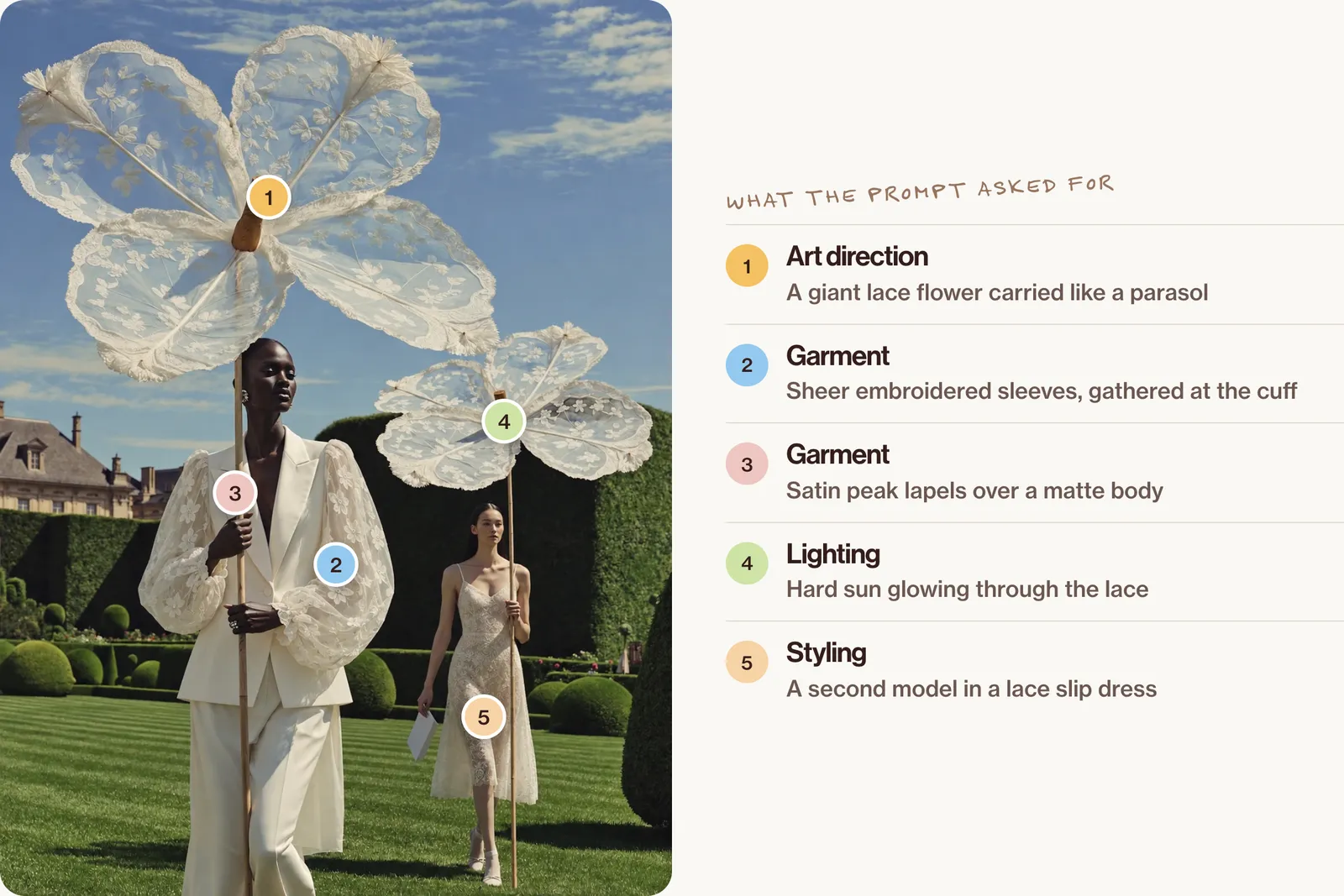
For more on editing with references, see Nano Banana prompts.
Step 4: Check every image against the real garment
This is the step most guides skip, and the one that matters most. Put the AI image next to your real photos and check:
| Check | What to look at |
|---|---|
| Fit | Length, sleeve length, waist, how loose or close it sits |
| Fabric | Weave, sheen, weight, how it drapes and creases |
| Colour | Against your colour reference and the real piece in daylight |
| Print and details | Scale, placement, repeats, stripe count, buttons, logos, stitching |
| Back and hidden parts | Only trust a back view if you gave it a back photo |
| Things that hide the garment | Hands, hair, bags or poses covering the details |
When an image fails, regenerate from the original references, not from the last output; fix the detail with a targeted edit; or use a real photo for that view.
Step 5: Build the lookbook
Plan it like a real photoshoot for a clothing brand. Keep the model, light and palette fixed, and change one thing per frame: the pose, the place or the framing. A six-frame lookbook could be: full length in the studio, walking on a garden path, seated on a stone bench, a close-up of the lapel and hands, a back view, and a street frame.
A consistent mood is what makes AI fashion photography feel like a collection rather than a pile of images. Here is a concept campaign we made with AI: one palette of ivory and lawn green, one kind of light, and one playful prop throughout.
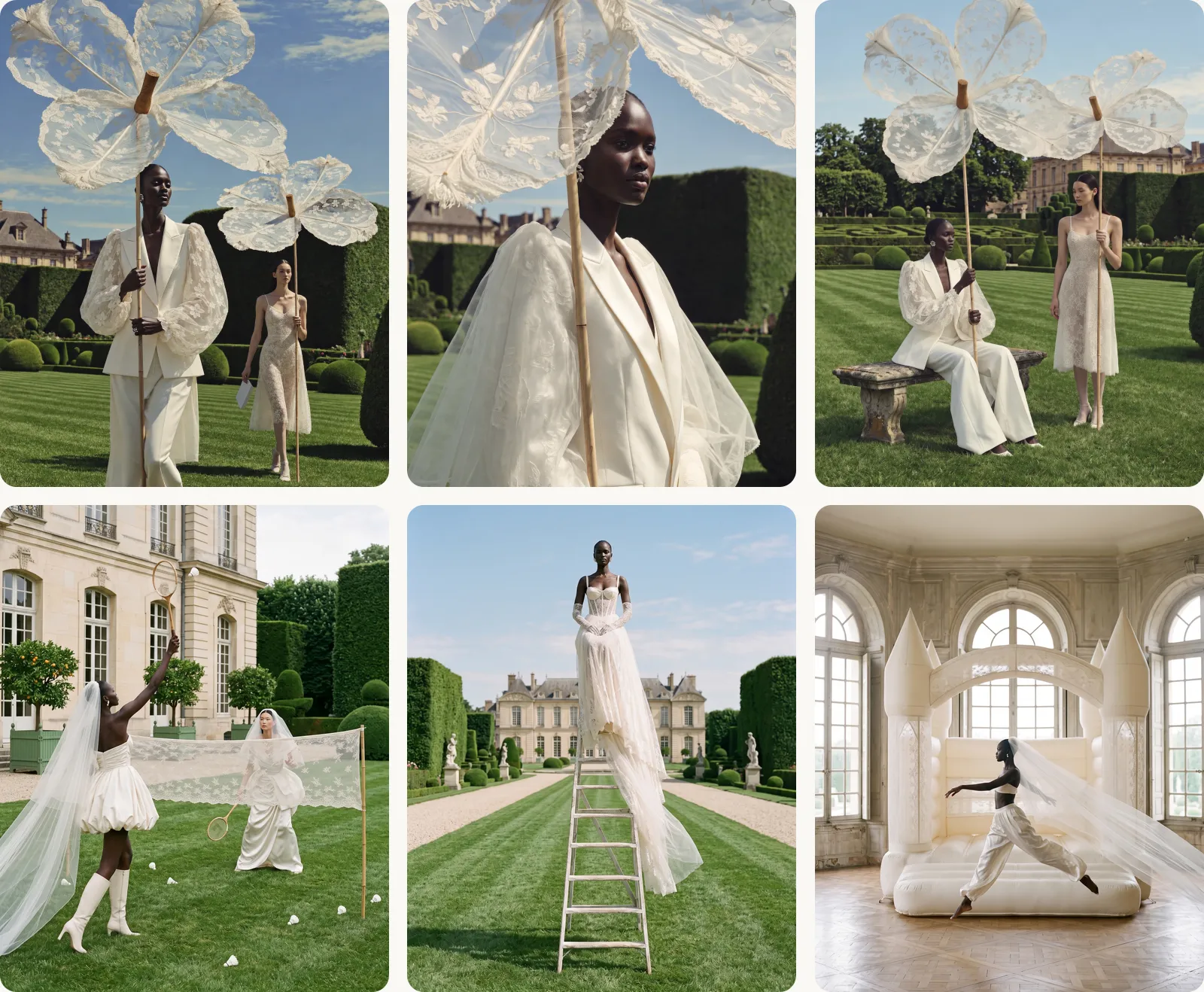
The bench frame from that set, as a prompt you can reuse:
Creative direction: a quieter frame from the same château garden story, shot on medium-format film. Art direction: the woman from the reference sheet sits sideways on a weathered stone bench in the middle of a striped lawn, holding her lace flower's bamboo pole upright with both hands and looking off to the side; the second model stands beside her in the ivory lace slip midi dress, holding her own pole, the two giant flowers overlapping above them. She wears the blazer from the garment photos open over wide ivory trousers and pointed white flats. The blazer is an ivory single-breasted blazer with a smooth, matte crepe body, fitted at the waist with princess seams and ending at the hip, peak lapels faced in ivory satin with a soft sheen that open to a deep V, a concealed front closure, and full, sheer ivory tulle balloon sleeves embroidered with five-petal flowers and leaves, gathered at the shoulder and into a ruffled cuff at the wrist, and must match the photos exactly. Material: matte crepe, satin lapels and see-through embroidered tulle sleeves; a lichen-spotted stone bench with carved legs; a box-hedge parterre maze, cone topiaries and clipped yew walls. Palette: ivory and cream, lawn green, soft summer-blue sky, the honey stone of the château. Lighting: bright summer sun from the left, short shadows under the bench and the models, light shining through the lace. Photography: 35mm look from standing height, f/11, everything sharp from the bench to the château, vertical 3:4. Mood: still, elegant, a little surreal. Post-processing: true colour, fine film grain, no glow.And the detail shot from Step 1, the picture that proves the fabric:
Creative direction: a detail shot for the product page that proves the fabric and finishing. Art direction: a tight crop of the left side of the blazer laid flat, the satin peak lapel beside the top of the sheer sleeve where it gathers into the shoulder, no person. Material: the matte crepe body, the soft sheen and pressed edge of the satin lapel, and the see-through tulle sleeve with raised embroidered five-petal flowers and leaves, each petal outlined in fine stitching. Palette: ivory on warm white. Lighting: soft, even studio light from above, a faint shadow under the lapel edge and the gathers. Photography: shot straight down, 100mm macro look at f/11, everything sharp, vertical 4:5. Mood: precise, tactile. Post-processing: true colour, no sharpening halos.If close-ups show skin that looks too smooth, see how to fix plastic skin.
When to still shoot real photos
Book a real shoot for:
- Fabric-led pieces: knits, sheers, linen, satin.
- Fit-critical items: tailoring, swimwear, denim.
- The main product image and the size guide.
- Anything with fine print or embroidery that the AI keeps changing.
- Launch campaigns where you want real people and their stories.
A hybrid works well for most small brands: one real shoot for accuracy, AI for variety and campaigns. The same thinking applies to any product; see AI product photography.
FAQ
Can I use an AI model for my clothing brand?
Yes, as long as the images show your garments accurately and you follow your platform's labelling rules. Use invented models, or real ones with written, paid consent.
How do I put my clothes on an AI model?
Photograph the garment flat and on a hanger, create one model reference, then attach both to an image model with a fixed garment sentence, or use a try-on tool.
How do I keep the same AI model in every photo?
Use one reference sheet for every image and describe the model the same way each time. Regenerate from the original reference when the face drifts.
Will AI change my garment's colour, print or fit?
It can. Check every image against the real piece for fit, fabric, colour and details before you use it.
Is it cheaper than a photoshoot?
It costs tool subscriptions and your time, and you will still want a smaller real shoot for accuracy. How it compares depends on your brand.
Go further
One blazer and one lookbook is just the start. Inside New Creator Club you learn the whole AI toolkit, from campaigns and product shots to UGC ads and video, so your brand can look like it has a full studio behind it. Start creating.
Keep reading
AI product photography: one packshot, a full studio shoot
AI product photography from one packshot: a full studio shoot that keeps the label and colours true, with a worked example, the prompts and the checks.
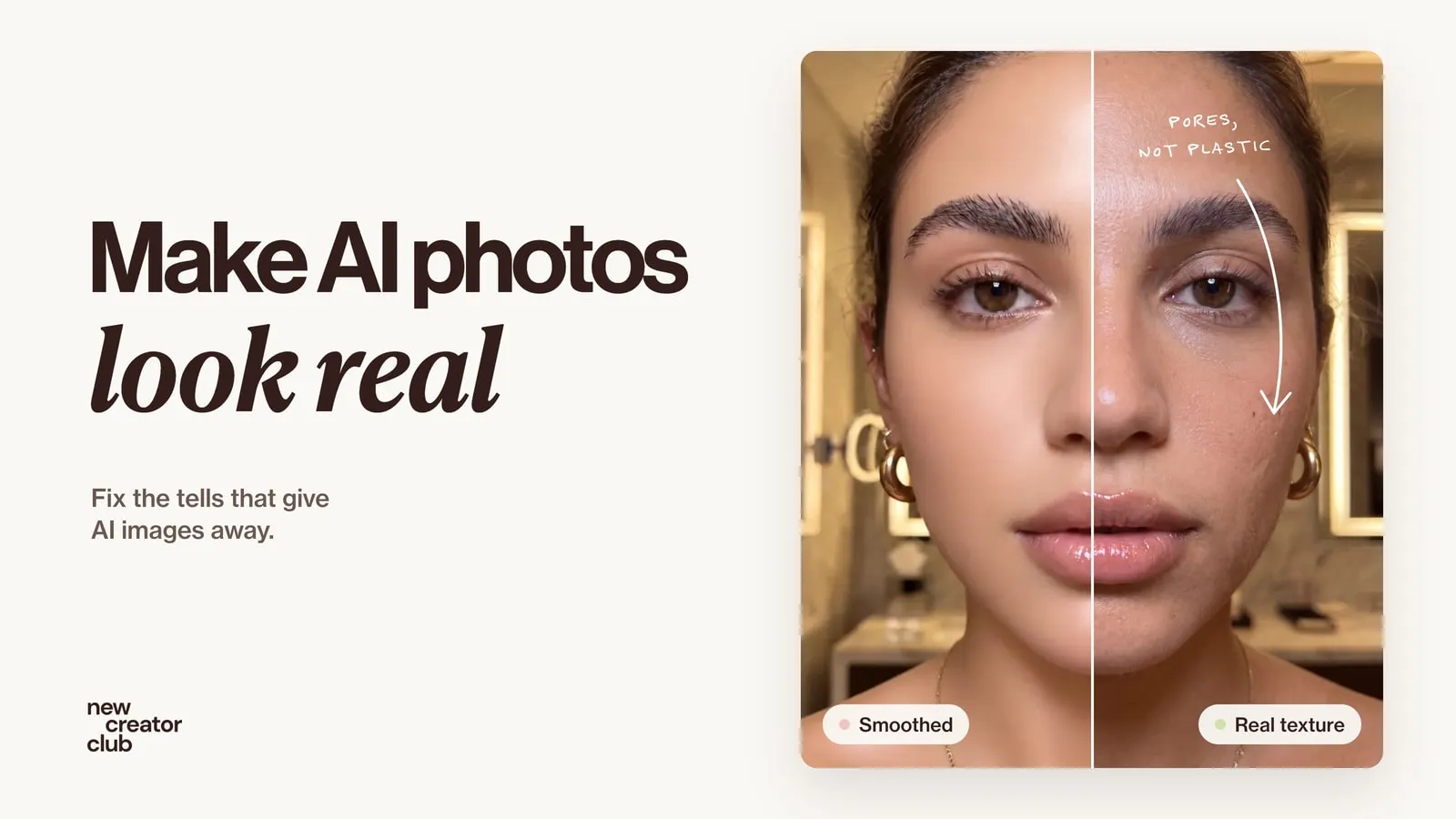
How to make AI photos look real
How to make AI photos look real: why they look fake, and the exact prompt change that fixes each tell, from plastic skin to impossible light.
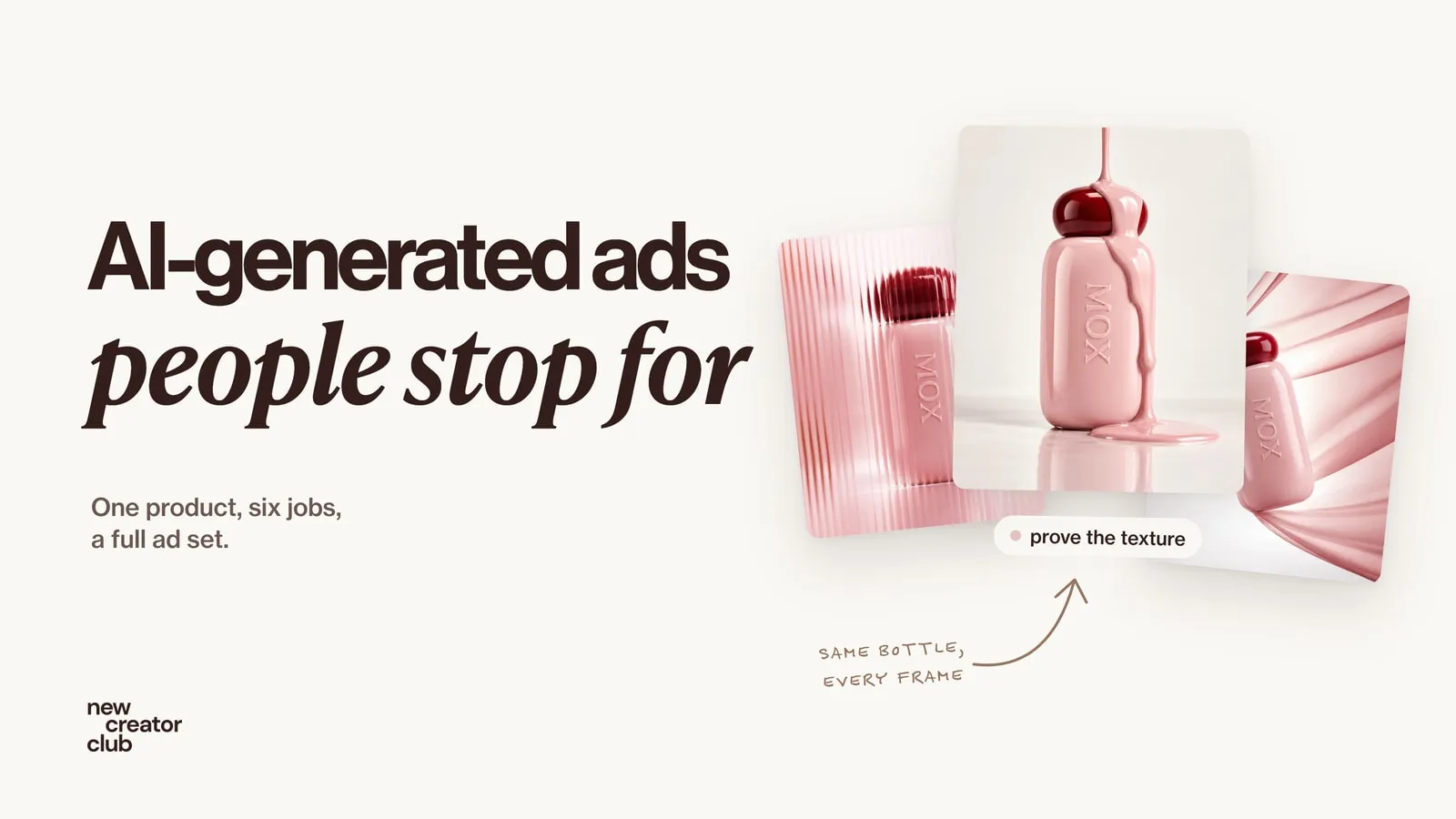
AI-generated ads people don't scroll past
How to make AI-generated ads that stop the scroll: one product kept exact, six ad jobs, a prompt for each frame, feed and story layouts, and what to test.